
Laptop Riser Feet vs a Stand: Which Fits Your Setup?
Content restored from the November 6, 2026 store snapshot. This browsing-only preview does not accept orders or payments.
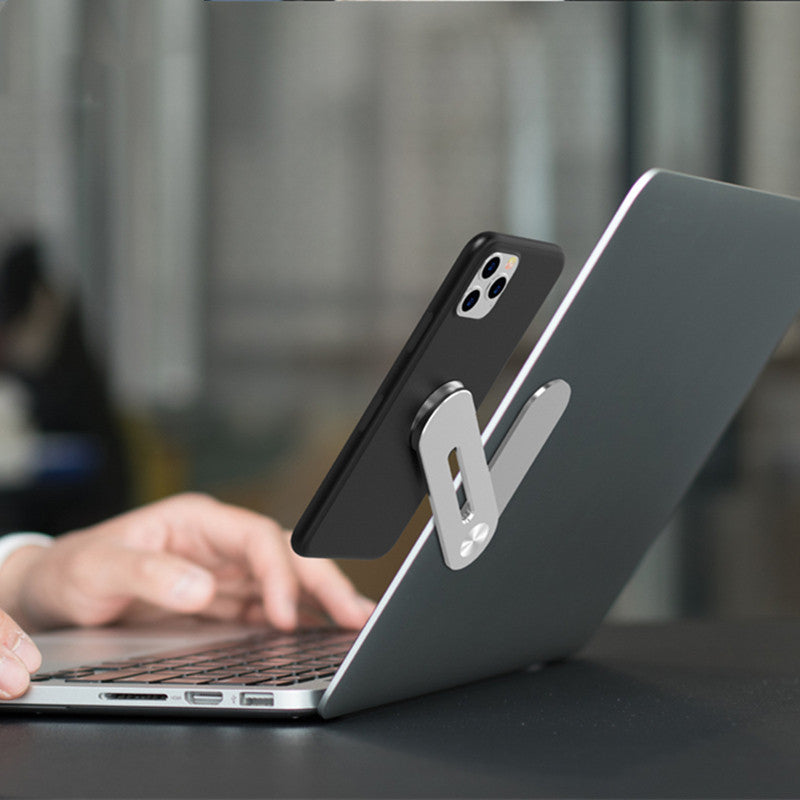
Choose laptop riser feet when you want a small change to the laptop's rear angle and a compact accessory to carry. Compare a full stand when you want a more elevated screen arrangement and have room for a separate keyboard and mouse. In both cases, device fit and stable support come first.
Compare the complete setup
| Decision | Riser feet | Full laptop stand |
|---|---|---|
| Main purpose | A small rear lift | A raised laptop support; adjustment depends on the model |
| Desk planning | Laptop footprint plus cable access | Stand base, open laptop, keyboard and mouse |
| Travel planning | Check attachment and packed dimensions | Check folded size plus any peripherals you will carry |
| Fit checks | Laptop underside, vents, feet and attachment method | Support dimensions, laptop weight, retaining edge and load limit |
| Typing | Try the resulting angle and stability | Plan the typing area independently of the raised screen |
These are design categories, not standardised specifications. A product called a “riser” can also be a large desktop platform. Read the exact dimensions and installation instructions rather than deciding from the name alone.
When compact feet make sense
If your aim is a modest rear lift while moving between desks, Portable Laptop Riser Feet are a category to consider. DeskBoost currently lists a Silvery variant. Before ordering, confirm how the feet attach and whether the intended position clears your laptop's ventilation openings and existing feet.
A small rear lift does not provide the same screen positioning as a tall stand. It also should not be treated as proof of improved cooling. This guide does not claim a measured temperature reduction or universal device compatibility.
When a full stand is the better category to compare
For a desk where the laptop screen and typing area need separate positions, compare laptop stands. A rotating design changes viewing direction; adjustment range, height and supported weight still need to be checked for the particular model.
The Rotating Aluminum Laptop Stand has Silver and Dark Grey options in the current catalogue. Choose a finish after confirming the laptop support dimensions and load limit for your device. A colour choice does not answer a fit question.
A practical two-layout test
- Write down your laptop model, body dimensions and weight.
- Sketch your current laptop-only layout, including cable exits and normal mouse movement.
- Sketch the raised layout with a separate keyboard and mouse. Add the proposed stand footprint once confirmed.
- Compare which arrangement leaves the workspace you actually need for notes, calls or other equipment.
- For travel, list everything that must fit in the bag, including chargers and peripherals.
For example, a stand that folds neatly may still require you to carry an external keyboard. Conversely, compact feet might be easy to pack but not achieve the screen position you wanted. Judge the whole routine rather than one accessory's apparent size.
Questions to settle before buying
Will either option fit every laptop?
No universal fit is established here. Screen diagonal alone does not describe the laptop body, weight or underside layout. Compare your actual device with the accessory's verified specifications.
Do I need a separate keyboard?
A raised laptop moves its built-in keyboard with the screen. If you want those two positions independent, include an external keyboard and pointing device in your plan. Check whether they are included; DeskBoost accessories are sold separately unless the selected package says otherwise.
Can I choose from the photos alone?
Use photos to understand the design, but confirm attachment, dimensions and load limits in writing when they matter to your device. Photographs do not establish a universal compatibility range.
Use the laptop stand buying checklist to narrow the options, or send DeskBoost your laptop model and fit question.
By DeskBoost. Product options checked October 20, 2026. This is a planning guide, not a hands-on product test. Check the selected variant before ordering.